Bring it to the nearest branch or call
- Vilnius Kareivių g. 11A +370 655 77057
- Kaunas Savanorių pr. 155 +370 639 69600
- Klaipėda Sausio 15-osios g. 13 +370 647 07741
- Šiauliai Gegužių g. 30 +370 682 29052
All branches are open Mon–Fri 9:00–18:00
A KIA navigation update is needed when your car appears on the screen to be driving across a field, even though there is already a new street or roundabout there. Factory maps become outdated over time, and KIA systems from different years work differently: some store maps on an internal HDD, others on CDs, and others on an SD card.
On this page you will find which system suits your Ceed, Rio, Sorento, Sportage or Venga, what to prepare before contacting us, and how to get in touch with one of our four branches.
Common KIA navigation problems
Below are the symptoms for which drivers most often contact us about factory navigation. The exact cause can only be determined once the system type is known.
The navigation does not show new roads and roundabouts
The map version is outdated. The system does not update the factory maps by itself unless a newer version has been installed.
What you can check yourself: Check the map version in the system settings menu and take a photo of it.
We update the maps according to the system type: HDD (k1), CD (k2) or SD card (k3).
The navigation says there is no card or map
The SD card is inserted incorrectly, damaged, or does not contain suitable map files.
What you can check yourself: With the ignition off, carefully remove and reinsert the card, and check that it is not bent or dirty.
We check the card and, if necessary, prepare a new one with maps for the Sportage system.
The navigation does not read the CD
The disc is scratched or dirty, the disc number does not match the region, or there is a problem with the disc drive.
What you can check yourself: Wipe the disc with a soft cloth from the center outward, and make sure you are using the disc for the correct region.
We assess whether the disc or the reader is at fault and choose a suitable solution.
The navigation cannot find satellites or does not start
The system, antenna or software may be faulty. The cause depends on the model and year.
What you can check yourself: Try it in an open area, not in an underground car park, and note whether the error recurs.
We run diagnostics and tell you what to do next.
Which KIA navigation system does your car have?
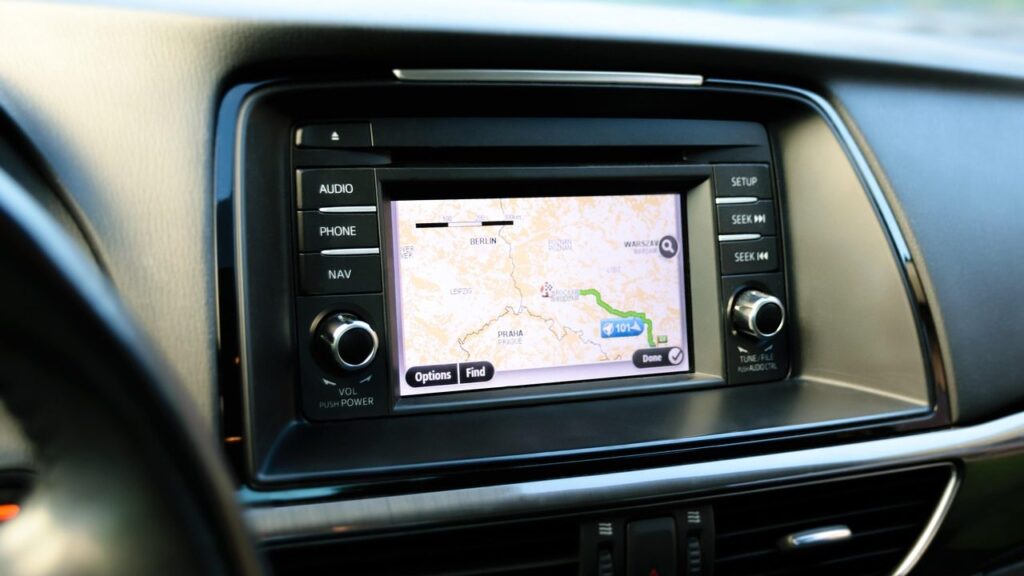
Before updating the maps, the most important thing is to know the system type. It is determined mainly by the car model and year of manufacture, not by the look of the screen – the same system may look different from the one in the photo.
We divide our services into three options, marked with the codes k1, k2 and k3:
- k1 – AVN USB: the internal HDD is updated with the latest maps. Suitable for Ceed from 2009, Rio, Sorento from 2010, Sportage from 2010 and Venga 2009.
- k2 – CD „Turn by Turn”: the maps are supplied on a dozen or so CDs (Estonia, Latvia and Lithuania – CD3; Czech Republic, Poland and other Eastern European countries – CD4). Intended for various KIA cars up to 2010.
- k3 – Sportage with SD card: the latest map SD card for the KIA Sportage from 2010. The maps cover, among others, Lithuania, Latvia, Estonia, Poland, Germany, Turkey and Ukraine – we will provide the full list of countries according to your needs.
If your car model or year is not in the list above, please call us first – we will determine the suitable option based on the model and year of manufacture.
Is it worth updating KIA navigation maps?
Newer maps help when traffic arrangements change: new streets, roundabouts or altered traffic directions appear. An old version may suggest a route that no longer matches the real road.
Built-in navigation has its own advantages: it does not need mobile internet, does not use your phone’s battery and shows the route on the car’s screen.
If you only drive around your own city, an update may not be so urgent. However, before a longer trip around Europe – Poland, Germany, Italy or Scandinavia – it is worth getting a more recent map version.
What to prepare before requesting a KIA navigation update
The more precisely you know your car’s details, the easier it will be to determine the right solution. Our branches are open Mon–Fri 9:00–18:00 and closed at weekends – there is no need to register or call in advance, simply come to any branch during working hours.
- car model and year of manufacture (e.g., Sportage 2012);
- system type, if you know it: HDD, CD or SD card;
- a photo or description of what the navigation screen and menu look like;
- problems you have noticed: new roads are not shown, it asks for a card, it does not read the disc.
Take a photo of the main navigation screen and the menu showing the map version – this helps identify the system.
Updates for other brands and similar systems
If your family also has a Hyundai, read about the Hyundai navigation update.
For the general principle of map updating, read the page navigation map updates, and for portable devices, see the page about TomTom, Garmin and iGo updates. How satellite navigation works is described in the article How a GPS navigation system works.
How a KIA navigation update works
- Contact us by phone. Call the car navigation phone number on weekdays Mon–Fri 9:00–18:00 and tell us your car’s model and year.
- We identify the system type. Based on the model, year and screen description, we determine whether it is an AVN USB (k1), CD (k2) or SD (k3) system.
- We agree on the price and the visit. We tell you the exact amount and agree on which branch – in Vilnius, Kaunas, Klaipėda or Šiauliai – is most convenient for you to visit.
- We update the maps. We install the latest maps for your system type and check that the navigation works.
Frequently asked questions about KIA navigation updates
How can I find out which KIA navigation system is in my car?
The system type mostly depends on the model and year of manufacture. Call the car navigation phone number, tell us the model and year and describe the screen – we will determine whether it is an AVN USB, CD or SD system.
Do you update KIA Sportage navigation?
Yes, for the Sportage from 2010 there are two variants: with an internal HDD (AVN USB) and with an SD card. Which one applies depends on the specific trim level, so we will confirm it based on your car.
Do the maps include detailed Lithuania?
Yes, detailed Lithuania is specified for AVN USB and CD systems (for the CD system – the CD3 disc together with Latvia and Estonia). SD card maps also cover Lithuania.
How much does a KIA navigation update cost?
The price depends on the system type and the car model, so we do not list it on the page. Call the car navigation phone number, provide the model and year, and you will learn the exact amount.
When can I come to a branch?
Our branches in Vilnius, Kaunas, Klaipėda and Šiauliai are open Monday–Friday 9:00–18:00 and closed at weekends. No registration is needed – just drop in during working hours and tell us about your car’s system.