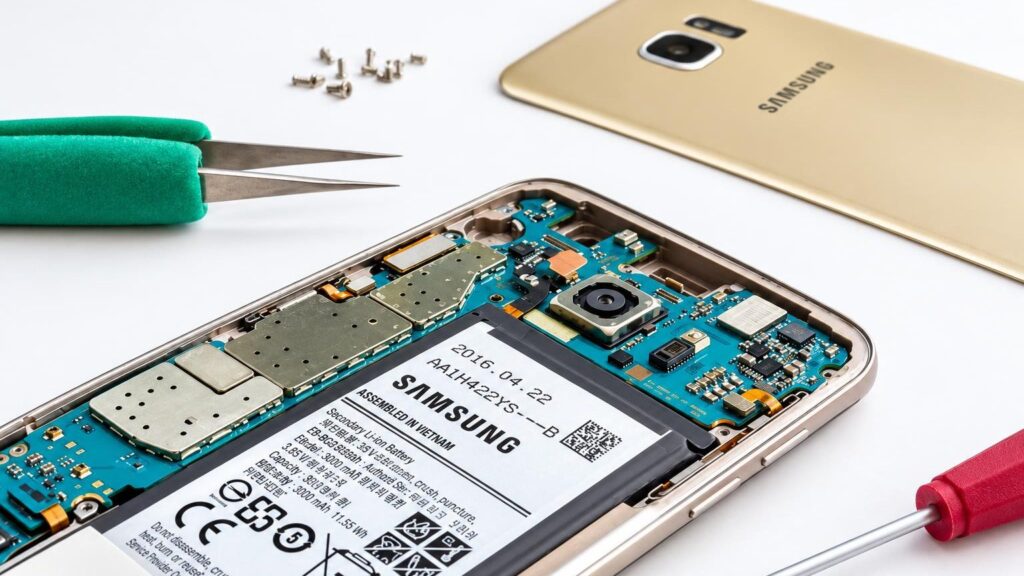
Bring it to the nearest branch or call
- Vilnius Kareivių g. 11A +370 655 77057
- Kaunas Savanorių pr. 155 +370 639 69600
- Klaipėda Sausio 15-osios g. 13 +370 647 07741
- Šiauliai Gegužių g. 30 +370 682 29052
All branches are open Mon–Fri 9:00–18:00
Samsung phone repair is most often needed for three reasons: a broken screen, a battery that drains quickly, and a charging port that no longer works. If your Galaxy has failed, it does not mean you need to buy a new one – often it is enough to replace a single part, which usually costs considerably less than a new phone.
On this page you will find the most common faults described the way people search for them („phone not working”, „not charging”, „screen broken”), tips on how to decide between repair and a new device, and a simple overview of the repair process. We repair Galaxy S and A series phones, as well as older models. If you have a different brand, see the general phone repair page.
Samsung phone repair prices
The price depends on the model and the fault, so we give it after diagnostics, before starting the repair.
| Service | Price | Warranty |
|---|---|---|
| Screen replacement (glass, LCD module) | after diagnostics | depending on conditions |
| Battery replacement | after diagnostics | depending on conditions |
| Charging port repair | after diagnostics | depending on conditions |
| Drying a phone after contact with water | after diagnostics | depending on conditions |
| Software update and repair | after diagnostics | depending on conditions |
Most common Samsung phone faults and their solutions
Below are the faults Galaxy owners contact us about most often, and what usually helps.
Samsung screen is broken
A drop or pressure most often damages the glass and the screen module. If spots or stripes have appeared on the screen, or it no longer responds to touch, it is usually the screen itself that is damaged, not just the glass.
What you can check yourself: Avoid drops and do not use the phone with sharp glass edges, so you do not get hurt. Make a backup before bringing it in, if the screen still allows it.
We replace the screen glass or the LCD module. The price depends on the model; we will give the exact amount after diagnostics.
Samsung battery drains quickly or has swollen
Over time, battery capacity decreases, especially after 2–3 years of intensive use. When the phone shuts down at 20–30% or gets hot while charging, the battery is usually worn out.
What you can check yourself: In „Settings – Battery”, check which apps use the most power, and try a different charger. If the back of the phone is lifting or the screen is separating, stop using it and do not charge it.
We replace the battery. You can read more about battery wear in the article about battery technology.
Samsung phone does not charge
Most often the cause is a clogged or worn charging port or a faulty cable, and less often the battery. Dust and lint from a pocket can prevent the connector from seating properly.
What you can check yourself: Try a different cable and a different charger. Inspect the port with a flashlight; if you see lint, carefully blow it out with compressed air. Do not use metal objects.
We diagnose whether the problem is in the port or the battery, and repair the charging port.
The phone is dead and won’t turn on
There are many possible causes: a discharged or damaged battery, a faulty port, a software error, or a motherboard fault after a drop or moisture. That is why it is hard to say exactly without diagnostics.
What you can check yourself: Charge for 15–20 minutes with a different charger, then press the power and volume down buttons together for about 10 seconds. If the phone was wet, do not turn it on.
Within 1 business day we carry out the initial diagnostics and tell you what has failed and how much the repair will cost.
Samsung phone got into water
Even if the model has water protection, the seals wear out over time. Moisture damages the contacts, so the later the phone is examined, the higher the risk of corrosion.
What you can check yourself: Turn off the phone, do not charge it, and do not dry it with a hair dryer or in an oven. Remove the case and the SIM tray, place the phone in a dry spot and bring it to us as soon as possible.
We dry the phone after contact with water and test how it works. If parts need to be replaced, we discuss this with you before starting any work.
The phone overheats or runs slowly
Overheating is caused by an overloaded app, a weak battery, a faulty charger or background processes. Slow performance is often due to full storage or outdated updates.
What you can check yourself: Close unnecessary apps, check the free storage and update the system. Read why a phone overheats while gaming.
We check the battery and the software; often the problem is solved by a newer battery or a software fix.
I can’t hear the other person, or the other person can’t hear me
The speaker or microphone openings often get clogged with dust; the component itself fails less often. After a drop or water exposure, the contact may be interrupted.
What you can check yourself: Check whether the case or screen protector is covering the openings and whether the phone is in silent mode. Test the sound with headphones.
Bring the phone to a branch – after diagnostics we will tell you what failed and whether it can be repaired.
The phone has no network or does not work abroad
Data roaming may be turned off, the SIM card may be faulty or the network settings may be incorrect. Sometimes the problem is a network-locked phone or a software error.
What you can check yourself: Check whether data roaming is enabled, restart the phone, and try the SIM card in another device. See also phone unlocking.
We check the settings and the software; if necessary, we fix the software side.
Cracked back glass or camera lens glass
The back glass cracks when dropped or from an impact against a hard surface. A cracked lens glass can let in dust and moisture and degrade photo quality.
What you can check yourself: Avoid drops and do not use the phone with sharp glass edges. Use a case.
Whether the back glass or camera lens glass can be replaced depends on the model – we assess this when you come to a branch.
Is it worth repairing a Samsung phone or buying a new one?
A simple rule: if the repair costs no more than a third of the price of a similar new phone and the device is basically working well, it is worth repairing. For example, a five-year-old Galaxy A52 with a new battery or screen will still serve for many years for calls, messages, browsing and photos.
It is worth replacing the phone when there are several faults at once: a faulty motherboard, software updates no longer available, and a broken screen on top of that. In that case, the investment in repair will most likely not pay off. We will tell you this honestly once we have assessed the fault.
Another argument is your data. When a screen or battery is repaired, photos, contacts and apps usually stay on the phone, whereas with a new phone everything has to be transferred. It is still worth making a backup before the repair if the phone still turns on.
- Worth repairing: a broken screen, a worn-out battery, a faulty charging port.
- Worth considering a new one: several major faults at once, a very old model without security updates.
- Ask for advice: if you are not sure, bring the phone to a branch – we will discuss the price before starting any work.
If the phone still works, make a backup via Samsung Cloud or your Google account before you come.

Samsung warranty repair and out-of-warranty repair
Many people search for „Samsung phone warranty repair”. If the phone was bought recently and the fault appeared through no fault of yours (for example, the screen or motherboard stopped working on its own), it is best to first contact the seller or the manufacturer’s warranty service. Such cases are usually handled according to the purchase terms and the receipt.
The manufacturer’s warranty usually does not cover mechanical damage, traces of liquid or a broken screen. In such cases, as well as when the warranty has already expired, you can come to us – we will assess the fault. Before handing in the phone for warranty service, do not take it to be repaired elsewhere: the terms depend on the seller and the model.
Our work is covered by a warranty. We will specify its duration and terms when providing the price.
Bring your purchase receipt or invoice – they come in handy if you need to find out whether the seller’s warranty is valid.
Which Samsung phones we repair and what to bring
We repair Galaxy S and A series models – from older S7, S8, S9 or A3 to S20 and A52, as well as foldable Z Flip and Z Fold. We also repair older Note, J and Tab models. Please check at a branch whether suitable parts are available for a specific model, as this depends on the model.
The cost of a screen replacement varies by model: it depends on the screen type and the availability of the part. You can read about screen types and differences in the article AMOLED, LCD and IPS screens.
When you come, bring the phone and, if possible, the original charger, and tell us when and how the fault appeared. If the phone is locked, know the PIN code or unlock method. If you need unlocking or a software service, see phone unlocking.
- The phone and, if you have it, the charging cable.
- Unlock code or pattern.
- A short description of the fault: when it started, and whether there was a drop or exposure to moisture.
- Proof of purchase, if you believe the warranty applies.
Samsung TV repair is described on a separate page: TV repair.
How Samsung phone repair works
- Bring your phone to a branch. Visit our Vilnius, Kaunas, Klaipėda or Šiauliai branch Mon–Fri 9:00–18:00. Tell us what happened and leave the phone with us.
- Initial diagnostics. Within 1 business day we determine the cause of the fault. If needed, we tell you whether the phone is worth repairing or whether the repair would not pay off.
- We agree on the price. Before starting any work, we tell you the price. The repair is carried out only with your consent.
- Repair. We replace the screen, battery or another part, or fix the software. After the work, we check that everything is working.
- Collect your phone. The completed work is covered by a warranty; we will confirm its duration and terms when we provide the price. If you have any questions, drop by and see us.
Frequently asked questions about Samsung phone repair
How much does a Samsung screen replacement cost?
The price depends on the model, the screen type and the availability of the part. We will tell you the exact amount after diagnostics, before starting the repair.
How much does a Samsung battery replacement cost?
The price depends on the model and the availability of the part, so we give it after assessing the phone. To learn when a battery is already worn out, read our article on battery usage habits.
How long does it take you to repair a Samsung phone?
We carry out the initial diagnostics within 1 business day. The repair time depends on the fault and the availability of the part – we will confirm it after diagnostics.
Does the repair come with a warranty?
Yes, the completed work is covered by a warranty. We will confirm its duration and terms when we provide the price.
Will my photos and data be kept after the repair?
When replacing a screen, battery or charging port, data is normally not altered. Even so, it is worth making a backup before the repair if the phone still turns on.
Do you repair Samsung phones in Kaunas, Klaipėda and Šiauliai?
Yes, we accept Samsung phones at our Vilnius, Kaunas, Klaipėda and Šiauliai branches. We are open Mon–Fri 9:00–18:00 and closed at weekends.
My phone won’t turn on – what should I do first?
Try charging it for 15–20 minutes with a different charger, then press the power and volume down buttons together for about 10 seconds. If the phone got wet, do not turn it on. If this doesn’t help, bring it to a branch and we will assess the fault.
Is it worth repairing an older phone, such as a Galaxy S9 or A5?
If the phone still meets your needs, a new battery or screen can extend its life. However, very old models no longer receive security updates, so it is worth weighing up whether the repair pays off.