Bring it to the nearest branch or call
- Vilnius Kareivių g. 11A +370 655 77057
- Kaunas Savanorių pr. 155 +370 639 69600
- Klaipėda Sausio 15-osios g. 13 +370 647 07741
- Šiauliai Gegužių g. 30 +370 682 29052
All branches are open Mon–Fri 9:00–18:00
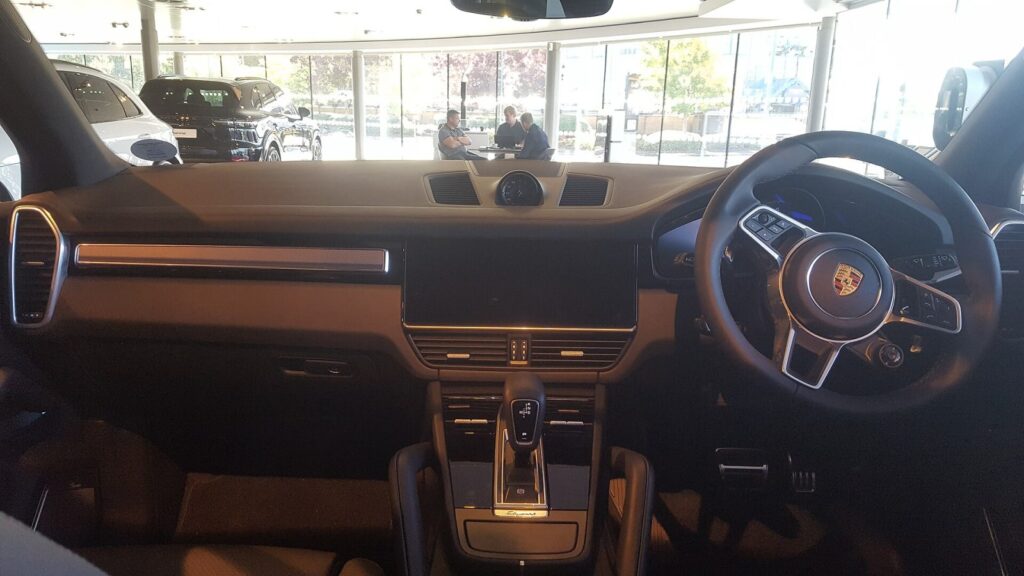
Looking for where to buy a Porsche navigation disc with new maps of Lithuania and Europe, or does the navigation in your Cayenne, Boxster or 911 no longer detect the disc? On this page you will find both versions: the DVD for the PCM 2.1 system (code po1) and the CD set for the PCM 2.0 system (code po2).
Below we explain how to identify your PCM version, which countries the maps cover, and what to check if your Porsche navigation shows an error or does not read the disc. If you are still wondering whether updating the maps is enough, also see the general description of navigation map updates.
Porsche navigation not working: the most common problems
PCM 2.0 and PCM 2.1 systems are no longer new, so the most common failures are the mechanical part – the disc reader – or the map disc itself becoming outdated. Here are the typical symptoms and what you can check yourself.
Porsche navigation shows „insert navigation disc”
Most often the disc is scratched, dirty or not suitable for your PCM version (PCM 2.0 uses a CD, PCM 2.1 uses a DVD). Sometimes a worn laser reader is to blame.
What you can check yourself: Check that the disc is clean and free of deep scratches, and that it matches your system version. Wipe it with a soft cloth from the center outward; do not use solvents.
If the disc is at fault, it can be replaced with a new one suited to your system. If the reader is suspected, consult the car navigation team by phone.
Porsche Cayenne navigation does not show the map
The disc may be missing, the wrong disc may be inserted, or the system may not find the data because of a read error. Less often, a GPS signal issue or a software error is to blame.
What you can check yourself: Remove the disc, make sure it is a navigation disc intended for this system, and insert it again. Turn off the ignition, wait a minute and start the system again.
If the problem persists, discuss it by phone with a car navigation consultant – together you will determine whether the disc or another part of the system is at fault.
Porsche navigation does not accept or spin the disc
A dirty or worn mechanism, a faulty motor, or foreign objects that have got into the reader. If the system has been left standing in the cold for a long time, the mechanism may jam.
What you can check yourself: Do not try to push or pull the disc out by force. Let the cabin warm up and try again.
A mechanical fault should be assessed by a specialist – for possible solutions, call us or visit a branch.
Porsche navigation shows an old map, new roads are missing
An older disc does not include new bypasses, roundabouts and motorway sections. PCM 2.0 and 2.1 systems do not update their maps automatically.
What you can check yourself: Check the disc’s release year and compare it with what the road looks like now. If the map is too old, the only solution is a newer disc.
We offer the latest Porsche navigation disc: a DVD for the PCM 2.1 system (code po1) or a CD set for the PCM 2.0 system (code po2).
Porsche navigation does not see my location or shows the wrong one
The GPS antenna or connector may be damaged, there may be a poor contact, or the disc may be old and not include your road. Incorrect position display is common after the battery has been disconnected or after bodywork repair.
What you can check yourself: Drive to an open area without tall buildings and wait a few minutes. Check that there are no items on the dashboard that could block the signal.
If there is no signal even in an open area, consult the car navigation team by phone about further steps.
Porsche PCM screen is dark or dim
Most often the screen backlight weakens, and sometimes the power circuit or a connector contact fails. The system may still be working – you hear the sound, but the image is barely visible.
What you can check yourself: Check the screen brightness and „day / night” mode settings. If the image disappears only after you start driving, this may indicate a poor contact.
A screen or backlight fault should be assessed by a specialist; for options, call us or visit a branch.
Porsche CD changer does not change discs or shows an error
The mechanism does not eject or pick up the disc, the laser is weak, or the disc is warped. In the PCM 2.0 system, it is important that each of the 8 navigation CDs is flat and clean.
What you can check yourself: Insert the first CD and check whether it is recognised. If one disc does not work while the others do, that disc is most likely at fault.
A damaged disc can be replaced with a new one. If the error recurs with all discs, the reader is suspected – please call us for advice.
Porsche navigation does not speak or voice guidance does not work
The navigation sound may be switched off, the volume set too low, or the signal path to the speakers may be faulty. Sometimes the problem is not in the navigation but in the audio system.
What you can check yourself: Check the navigation prompt volume setting and whether another audio source works normally.
If the settings are fine but there is still no sound, discuss the situation with a car navigation consultant.
Porsche navigation restarts or freezes
Common causes are poor contacts, a worn reader, or power fluctuations. If it freezes only while reading a disc, the reader or the disc itself is suspected.
What you can check yourself: Remove the disc and start the system without it. If the freezing disappears, the disc or the reader is at fault.
If the system freezes even without a disc, please contact us by phone or visit a branch for further steps.
Porsche Cayenne navigation does not recognise the map of Lithuania
The disc being used does not have a detailed map of Lithuania, or it is a disc from another system. In the PCM 2.0 system, Lithuania is not on the first but on the eighth CD.
What you can check yourself: Check the disc label and the system version. In the PCM 2.0 system, look for Lithuania on CD8.
We select the disc according to the car model and PCM type: DVD (code po1) or CD set (code po2).
Which Porsche navigation disc suits your car?
First, you need to know which system your Porsche has. PCM 2.0 uses CD navigation, while PCM 2.1 reads a DVD disc. These are two different products and they are not interchangeable.
According to the information we have, PCM 2.1 with DVD (code po1) suits the following cars: mid-2005 – mid-2008 sports models (9×7), mid-2005 – mid-2008 Cayenne and 911 (997), as well as 911 Carrera, 911 GT2, 911 GT3, 911 Targa 4, 911 Turbo, Boxster, Cayenne and Cayman. PCM 2.0 with CD (code po2) is intended for systems that read CDs.
- PCM 2.1 – DVD disc, code po1
- PCM 2.0 – set of 8 CDs, code po2
- If you are not sure about the version, tell us the model and year of manufacture – we will help you determine it
Before contacting us, write down the car model, the year of manufacture and, if you can, check whether the system reads DVDs or CDs.
Porsche navigation disc: which countries do the maps cover?
The PCM 2.1 DVD includes countries from Ireland and Great Britain to Greece and Finland, including the Baltic states, Poland, Germany, France, Italy, Spain and Scandinavia. Lithuania is shown in detail.
PCM 2.0 maps are divided into eight CDs by region. For example, CD1 – Czech Republic, Slovakia and Germany; CD2 – France and Monaco; CD5 – Austria, Switzerland and Liechtenstein; CD6 – Norway, Finland and Sweden. Lithuania (in detail), Latvia, Estonia, Poland and other countries are on CD8.
- CD3: Ireland, Belgium, Denmark, Great Britain, Luxembourg, Netherlands
- CD4: Andorra, Spain, Gibraltar, Greece, Hungary, Portugal
- CD7: Italy, San Marino, Vatican
- CD8: Bulgaria, Czech Republic, Estonia, Greece, Croatia, Latvia, Poland, Lithuania, Slovakia, Slovenia, Hungary
When travelling through several countries with PCM 2.0, take the CDs you need with you in advance – it is more convenient to change the disc when stopped than to look for it while driving.
Is it worth updating the disc, or replacing the entire navigation system?
If the system works, a new Porsche navigation disc is usually enough. The interior remains original, with all integrated functions, while the maps become more up to date.
If the problem is mechanical, it is first worth finding out whether the disc or the reader is at fault. Consult car navigation specialists by phone or at a branch about possible solutions – replacing the whole system is worth considering only when several components have failed at the same time.
Before deciding on a more expensive option, first try another, clean disc – this will quickly show whether the problem is in the disc or in the reader.
How to care for navigation discs and the reader
Most problems are caused by dust, heat and scratches. Keep discs in cases, not on the dashboard or in the sun, because in summer a closed car interior can get very hot, which deforms the plastic.
Do not insert cracked, glued or sticker-covered discs into the reader. If a disc gets stuck, do not try to pull it out with a knife or screwdriver – you may damage the laser and the mechanism. Contact a specialist who will remove the stuck disc without damaging the reader.
- Keep discs in cases and in a cool place
- Do not touch the laser-read surface with your fingers
- Wipe with a soft cloth from the center to the edges
- Do not use cleaning discs with brushes if the reader is already struggling
If you notice that the disc takes longer and longer to read, do not wait for a complete failure and consult a specialist.
How to order a Porsche navigation disc
- We identify your system. Tell us the car model and year of manufacture. Based on this, we determine whether you have PCM 2.1 (DVD) or PCM 2.0 (CD).
- You contact us. Simply drop by your nearest branch – there is no need to register or call in advance. All branches are open Mon–Fri 9:00–18:00 and closed on weekends.
- We select the right disc. If you need maps, we select the suitable disc: po1 for the PCM 2.1 system or po2 for the PCM 2.0 system. If the system does not read the disc or shows an error, you discuss the problem with a consultant.
- You confirm the price. The current price of the disc is confirmed before you order, so that you know what you are getting.
Frequently asked questions about the Porsche navigation disc
How much does a Porsche navigation disc cost?
The price depends on the specific version – a DVD for the PCM 2.1 system (code po1) or an 8-CD set for the PCM 2.0 system (code po2). Please confirm the current price by calling the car navigation phone line or at a branch.
What is the difference between PCM 2.0 and PCM 2.1 navigation discs?
PCM 2.1 uses a DVD (code po1), while PCM 2.0 uses eight CDs divided by region (code po2). These discs are not interchangeable.
Which Porsche models is the DVD navigation disc suitable for?
According to our information, the PCM 2.1 disc is suitable for the „Cayenne”, „Boxster”, „Cayman”, „911 Carrera”, „GT2”, „GT3”, „Targa 4” and „Turbo” models produced approximately in 2005–2008. If you are unsure, tell us the model and year.
Does the Porsche Cayenne navigation have a map of Lithuania?
Yes, Lithuania is covered in detail in both versions. On the PCM 2.1 DVD, it is on the same disc as other countries, while in the PCM 2.0 system you will find Lithuania on CD8.
Is it possible to update Porsche maps without a disc?
PCM 2.0 and PCM 2.1 maps are provided on discs, so updating requires replacing the disc.
What should I do if the Porsche navigation no longer reads the disc?
First, check that the disc is clean, undamaged and intended for your system. If it still does not read, the reader may be at fault – in that case, consult the car navigation phone line.
When are the branches open?
All branches are open Mon–Fri 9:00–18:00 and closed on weekends. You can find the contact details on the Contacts page.