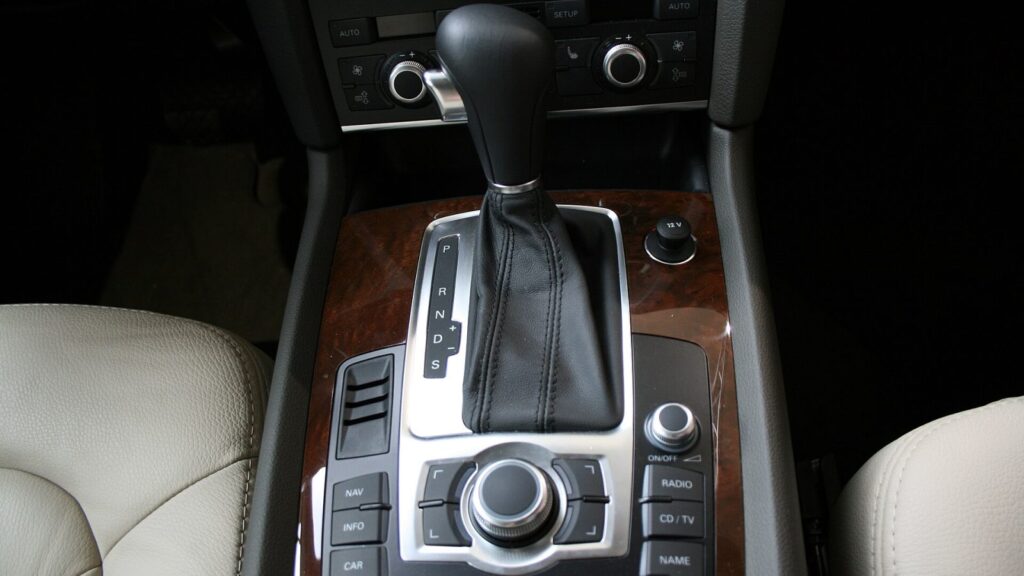
Bring it to the nearest branch or call
- Vilnius Kareivių g. 11A +370 655 77057
- Kaunas Savanorių pr. 155 +370 639 69600
- Klaipėda Sausio 15-osios g. 13 +370 647 07741
- Šiauliai Gegužių g. 30 +370 682 29052
All branches are open Mon–Fri 9:00–18:00
An Audi navigation update is needed when a new roundabout or motorway section has already appeared on the road, but it is not yet shown on the navigation screen. On this page you will find the Audi systems we work with: RNS4.x, RNS-E, MMI 2G, MMI 3G, MMI 3G+ and MIB. For each one, we explain how to identify it and which models it suits.
If you do not know which system is installed in your A4, A6 or Q7, below we explain how to find out in a few minutes. You will also find the most common causes of faults and a simple description of how the work is done at the branch. For more general information about other manufacturers, see the page navigation map update.
Most common Audi navigation problems
These are the symptoms we hear about most often. In most cases the cause is not faulty electronics, but outdated data, a frozen program or a poorly readable disc.
Audi navigation shows an old map
The maps are older than the road network: new roundabouts, bypasses or motorways are not marked. This is typical for systems that have not been updated for several years.
What you can check yourself: Check the „Settings” → „Version information” menu and write down the system type and map version.
We update the maps according to your system type.
Audi navigation does not detect the SD card
The card may be incompatible with the system, incorrectly formatted or have corrupted data. MMI 3G systems have two SD slots, so the card may be in the wrong slot. MMI 2G systems have no SD slot.
What you can check yourself: Remove the card, reinsert it and try the other slot. Do not insert sharp objects into the slot.
We check the card and the slot and, if necessary, write the maps again.
Audi navigation disc is not read
The CD or DVD may be scratched, dirty or poorly read due to an aging laser. In the MMI 2G system, the disc changer may also fail to recognize the disc.
What you can check yourself: Carefully wipe the disc with a soft cloth from the center toward the edges and try again. Try another disc from the set.
We check the disc and the reader and, if needed, provide a new map set.
MMI freezes or restarts
A software error, a frozen hard drive or voltage fluctuations, for example after a battery replacement. This occurs in older MMI 2G and 3G systems.
What you can check yourself: A4/A5/A6/Q5/Q7: SETUP + large knob (BIG KNOB) + upper right button. A8: TEL + BIG KNOB + upper right button. This action restarts the system, so make a note of your settings and radio stations.
If restarting does not help, a technician checks the system and determines whether the problem is software or hardware.
„No navigation data” or navigation is missing from the menu
A corrupted map file, an unsuccessfully updated hard drive or a map version unsuitable for the system. This often happens when people try to install the maps themselves.
What you can check yourself: Do not copy additional files and do not try several times. Write down the error text and the system version.
We determine the system type and reinstall the correct maps.
Audi A6 C7 navigation update fails
These cars require data that matches the specific system version. An incorrect version or an interrupted write can halt the process.
What you can check yourself: Determine whether the version starts with HN+ or whether it is MIB, and only then look for a suitable update.
We inspect the system and update the maps according to its type.
Navigation from the USA: wrong radio and miles
The car was brought from the USA, so the system is set to American parameters: miles, US radio frequencies and the map region.
What you can check yourself: Check whether the units of measurement can be changed in the menu. The frequency and region usually cannot be changed in the settings.
We change the navigation parameters from USA to EU and the radio frequency from USA to EU.
Navigation shows the car in the wrong location
A weak GPS signal, a covered antenna, or outdated maps in which the road is drawn differently. In rarer cases, the GPS antenna or its cable is at fault.
What you can check yourself: Drive to an open area without tall buildings and wait a few minutes. Check that there are no tinted films or foil stuck to the windscreen.
We carry out diagnostics and update the maps. If the GPS module is at fault, this becomes clear during the inspection.
How to find out which Audi navigation system you have
Audi used several completely different systems, and the map update is different for each. Some require a CD or DVD set, others an SD card, and for others the internal hard drive is updated. Therefore, you first need to determine what you have.
With third-generation MMI systems this is easy: open „Settings” in the menu, then „Version information”. If the version starts with BNav, it is MMI 3G Low/Basic. If HNav, it is MMI 3G with a hard drive. If HN+, it is MMI 3G+ (3GP).
- RNS4.x / BNS 4.x (TravelPilot DX) – the oldest Audis, up to 2004, with maps on CDs.
- RNS-E – A1, A2, A3, A4, A6, TT and other models up to 2012, with maps on three DVDs.
- MMI 2G Low/Basic – maps on CDs, A4, A5, A6 and Q7 from approximately 2004–2009.
- MMI 2G High – hard drive, map DVDs, a 6-disc changer in the front and a navigation unit in the boot. There is no SD card slot.
- MMI 3G (BNav and HNav) – 2008–2012, two SD card slots.
- MMI 3G+ (HN+) – from 2008 to the present, 40 GB hard drive, two SD slots, 7-inch 800×480 display.
- MIB – from 2015, maps are updated on the internal hard drive.
If you are unsure, come in with your car or photograph the screen showing „Version information” – that is enough for our technician to determine the system type precisely. The exact years depend on the specific trim level.
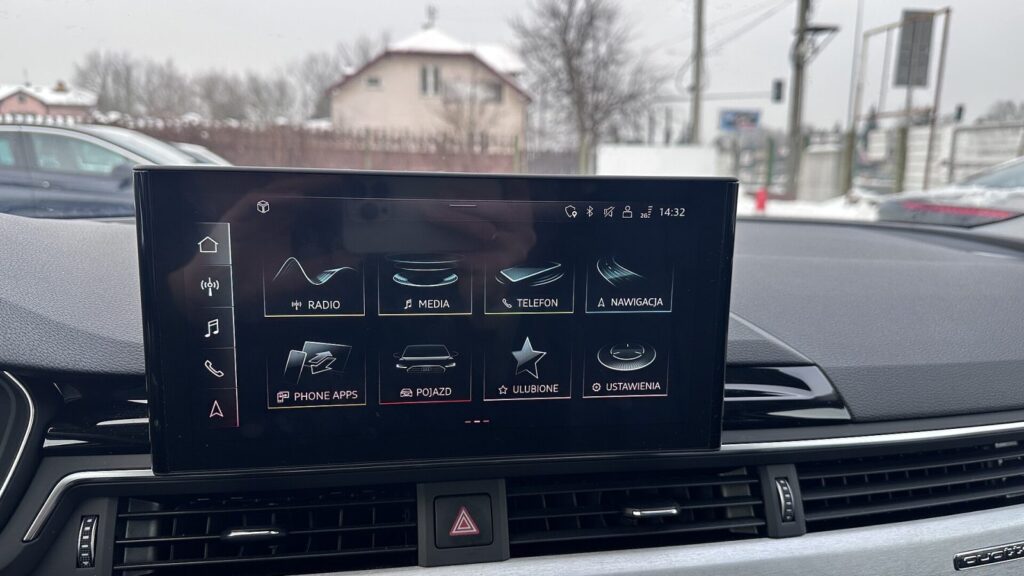
Audi A6 C7, A6 C6, A4 B7: which system and which disc
People often search by body code because that is how they recognise their car. Here we provide a general guide, but the system is always ultimately determined by the version information, not the year.
Audi A6 C6 most often has MMI 2G: in the simpler trim with CDs, in the higher trim with a hard drive and DVDs. Audi A4 B7 may have RNS-E with three DVDs, while later A4s have MMI 2G.
Audi A6 C7 is newer than the MMI 2G era, so it most often has MMI 3G+ or MIB. Which of the two it is will be shown by the „Version information”: HN+ means MMI 3G+, while MIB has its own interface.
What the map update includes and which countries
The latest map sets for MIB and MMI 3G+ systems include Germany, Austria, Belgium, France, Italy, Spain, the United Kingdom, the Scandinavian countries, Poland, the Czech Republic, the Baltic states and other European countries. Lithuania is covered in detail. The exact list of countries varies by system.
For MMI 2G and RNS-E systems, the maps are spread across several discs, so a single disc does not cover the whole of Europe. For example, the MMI 2G High DVD1 covers Western European countries, while DVD2 covers Central, Northern and Eastern Europe, including Lithuania.
It is worth knowing that an update changes the map data, not the capabilities of the system itself. An old MMI 2G screen will not become sharper, and it will not gain new features.
If you drive both around Western Europe and around Lithuania, it is worth having both DVDs for the MMI 2G High system.
Is it worth updating an old Audi navigation system?
An update is most useful when you drive a lot and on unfamiliar routes. Within a few years, new roundabouts, bypasses and changed traffic restrictions appear. A system that has not been updated may direct you along an old road or show that you are driving across a field.
If the car is older and the system runs on CDs, an update is still often simpler than installing another device. An alternative is a phone with a navigation app, but many people prefer an integrated system with controls on the steering wheel or the MMI knob.
If the system is not working because of a fault rather than outdated maps, diagnostics are needed first. You can read about how satellite navigation works in the article GPS navigation system operation.
What to bring to the branch
For car navigation enquiries there is a separate phone number, which you will find on the Contacts page. Calling in advance is not necessary – you can simply come during opening hours and describe the system, model and year of manufacture on the spot.
If the system uses CDs or DVDs, bring the existing discs, and if it uses an SD card, bring that too. If the Audi was brought from the USA, mention this in advance, as changing the navigation parameters or radio frequency may be required.
- car model and year of manufacture
- a photo or note of what the „Version information” screen shows
- SD card or discs, if used
- whether the car was imported from the USA
Visit us on a weekday between 9:00 and 18:00 – our branches are closed at weekends.
How an Audi navigation update works
- Just drop by. You will discuss your model and system type with the technician on site. Visit our Vilnius, Kaunas, Klaipėda or Šiauliai branch on a weekday between 9:00 and 18:00.
- We identify the system. Based on the „Version information” and the model, we determine whether it is MMI 2G, 3G, 3G+, RNS-E or MIB.
- We discuss the work. We tell you which update your system needs and discuss the price and timeframe.
- We update the maps. We install the latest maps or provide a set of discs suited to your system.
- We check the result. We check that the navigation works and displays Lithuania and Europe.
Frequently asked questions about Audi navigation updates
How much does an Audi navigation update cost?
The price depends on the system type and the car model. Drop by a branch during opening hours – tell us your system and the technician will give you the price.
How can I find out which MMI system my Audi has?
In the menu, open „Settings”, then „Version information”. If the version starts with BNav, HNav or HN+, the system is MMI 3G Basic, MMI 3G High or MMI 3G+ respectively.
Can I download Audi MMI navigation maps myself?
The files must match the system type and version exactly. Unsuitable data may cause a „no navigation data” error, so it is often safer to contact a technician.
Does the Audi A6 C7 navigation need to be updated with a CD or SD card?
In MMI 3G+ and MIB systems, the maps are stored on the internal hard drive, so a CD is not used. The „Version information” shows whether your A6 C7 has exactly this kind of system.
Will the look of the system change after a map update?
Usually not. The road, address and point-of-interest data change, while the interface and functions stay the same, as they are determined by the system itself.
Can you convert Audi navigation from the US to the EU?
Yes, we offer changing Audi navigation parameters from USA to EU and changing the radio frequency from USA to EU. These are two separate services, so please tell us which one you need.
How long does the update take?
The time depends on the system type and model. The technician will give you an exact timeframe once they know which system you have.
Can I update my navigation in a city other than the one I live in?
Yes, we provide this service at our Vilnius, Kaunas, Klaipėda and Šiauliai branches. You do not need to register or call in advance – just drop by on a weekday between 9:00 and 18:00.