Bring it to the nearest branch or call
- Vilnius Kareivių g. 11A +370 655 77057
- Kaunas Savanorių pr. 155 +370 639 69600
- Klaipėda Sausio 15-osios g. 13 +370 647 07741
- Šiauliai Gegužių g. 30 +370 682 29052
All branches are open Mon–Fri 9:00–18:00
Updating the car navigation in Mitsubishi vehicles depends on which multimedia system is installed in your car: MMCS with a hard drive, Melco / Grandis with DVD, or the newer MMCS with an SD card. On this page you will find how to identify your system, which maps are offered for each of them, and what to do when the navigation shows outdated roads or does not work at all.
If you are looking for how to update your car navigation, below you will find the most common causes of faults and a simple step-by-step procedure. For more general information about systems of all brands, see the page on navigation map updates.
Most common navigation faults and why your navigation is not working
Mitsubishi systems can have both simple and more serious faults. Here are the most typical symptoms and what you can check yourself.
Navigation shows outdated maps
The map data has not been updated, so new roads, roundabouts and speed limits are missing. This is the most common cause.
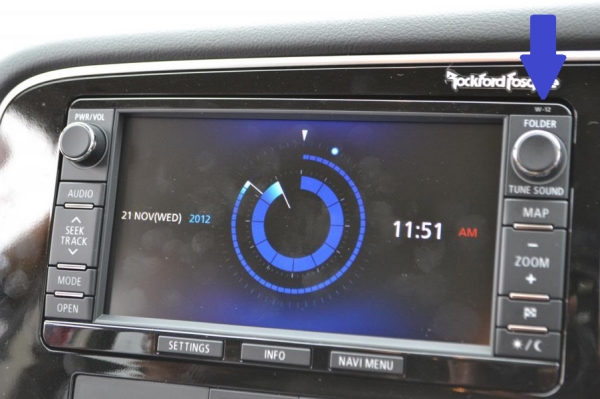
What you can check yourself: Look at the navigation version (in SD systems it is usually in the upper right corner after closing the screen) and write it down.
We update maps according to the system type: with an SD card, HDD or DVD discs.
Navigation does not detect the SD card
The card may be damaged, incompatible with the system, or have dirty contacts. Sometimes the problem is a software error in the system.
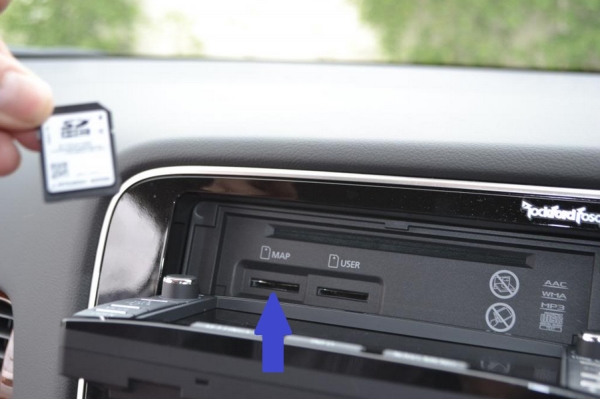
What you can check yourself: Check that the navigation card is in the correct slot and the music card is in the other one. Do not swap the cards or try to clean the slot yourself – if the system still does not detect the card, contact the workshop.
At the workshop, the card and the system are checked and, if necessary, a new card with maps is written.
The screen shows „no map” or a GPS error
The data may be corrupted, the card may not be recognised, and in HDD systems the hard drive may have started to freeze. A weak signal is sometimes also caused by an obstructed antenna.
What you can check yourself: Drive to an open area with a clear view of the sky and wait a few minutes. If the error does not disappear, leave the more complex work to the workshop.
We determine whether the software, the card or the hardware is at fault and propose a solution.
Car navigation shows the wrong location
The GPS receiver may be malfunctioning, the antenna cable may be damaged, or the system calibration may be off. This often happens after the battery has been disconnected.
What you can check yourself: Check that nothing is placed on the dashboard or on the antenna, and drive through an open area for ten or fifteen minutes.
We check the antenna connections and the receiver; what needs to be repaired becomes clear after the inspection.
Navigation disc is not read (Melco / Grandis)
Most often the laser reading head is worn or the mechanism is dirty. Scratched or poorly burned discs also occur.
What you can check yourself: Check that the disc is not scratched and that you are using the correct DVD1, DVD2 or DVD3.
We check the reader and, if necessary, discuss cleaning or replacing it and choosing the right disc.
Touchscreen is not working
The touch glass may be worn, there may be a fault with the frame or sensor, and sometimes the software is to blame. This occurs more often in Melco / Grandis systems.
What you can check yourself: Wipe the screen with a soft cloth and restart the system by switching off the ignition.
We determine whether the problem is in the screen, the sensor or the software, and discuss the repair options.
Navigation restarts or freezes
The most common causes are a software error, corrupted map data or an ageing HDD. This kind of fault often gets worse over time.
What you can check yourself: Switch off the ignition and wait a few minutes. If the error keeps recurring, do not try to fix it yourself.
We identify the cause and discuss whether it is enough to reinstall the maps or the software.
How to update your car navigation: which Mitsubishi system do you have?
Before calling, it is worth finding out which system you have. It determines whether the maps are updated using an SD card, DVDs or the hard drive. Below are six system variants, with the car models in which they are possible.
If the car has an SD card system, two SD cards should be visible when the screen is opened: one for navigation and the other for music. The navigation version can usually be seen in the upper right corner when the screen is closed.
- MMCS with HDD: Lancer 2008–2013, Lancer Sportback 2010–2013, Lancer Evolution 2008–2013, Outlander 2007–2013, Outlander Sport 2011–2013, iMiEV 2012.
- Melco / Grandis with touchscreen and DVD (models MP-8000, MP-8100, MP-8200, MP-8210).
- MMCS W11–W12 with SD card: Outlander, Lancer, ASX, Pajero, Pajero Sport.
- MMCS E12 with SD card: L2 Series 5, Pajero Sport.
- MMCS W13 with SD card: Outlander, Outlander PHEV, Lancer, ASX, Pajero, Pajero Sport.
- MMCS W15 with SD card: Outlander, Lancer, ASX, Pajero, Pajero Sport.
Make a note of the car’s year and the system version, if you can see it, or take a photo of the screen – this makes identifying the system much easier.
Navigation map update: what you get with each system
For SD card systems (W11–W12, E12, W13, W15), we offer the latest card with maps of all of Europe – it covers almost 40 countries and microstates, including Lithuania, Latvia, Estonia, Poland, Germany, the Scandinavian countries, the Balkans, Romania, Bulgaria and Moldova.
For the HDD system, the content of the hard drive is updated: a detailed map of Lithuania and more than 30 European countries, including Latvia, Estonia, Poland and Germany. For the Melco / Grandis system, there are three DVDs with maps of different countries. According to our list, the Baltic countries are not listed on these three discs, so please check before ordering whether this is sufficient for you.
For a broader overview of how navigation determines your position and why maps become outdated, read the article on how a GPS navigation system works.
Is it worth updating your car navigation, or should you use your phone?
Phone apps are convenient, but factory navigation has its own advantages: it shows the route directly on the car’s screen, usually does not require mobile internet and does not drain your phone’s battery. If you often travel abroad or to areas with weak mobile internet, you will notice the difference.
When the only problem is outdated maps, updating the existing system is enough. If the fault is technical, for example the system no longer reads the disc or the screen malfunctions, it is best to first find out the real cause and only then decide on a repair.
Not sure whether old map versions or a fault are to blame? Tell our technician about it – they will help determine where to start.
Updates for other brands and portable navigation devices
We also have separate pages for other brands, such as Mazda, Volvo or Toyota.
For information about updating portable devices, see the page TomTom, Garmin and iGo update.
What to bring and how to prepare for your visit
The more you know about your system, the sooner it will be clear which update to choose. Before you come, prepare a few small details.
- the car’s make, model and year of manufacture;
- the navigation version, if you can see it on the screen or in the corner;
- a photo showing what the screen and the card slots look like;
- a description of what happened if the navigation is not working: when the error appeared and whether a message is displayed.
For a specific system, first call the car navigation phone line – the number is given in the branch cards.
How navigation updates and repairs work
- Prepare the details. Write down the car model, year and navigation version, if you can see it. Then call the car navigation phone line and discuss the situation.
- Visit a branch. In Vilnius, Kaunas, Klaipėda or Šiauliai, come on weekdays between 9:00 and 18:00. Tell us what happened or what update you want.
- We identify the system type. We find out whether your system uses an HDD, DVD or SD card, and select the appropriate map version.
- We discuss the work and the price. If there is a fault, we first determine its cause. The price and scope of work are agreed before work begins.
Frequently asked questions about car navigation updates
How much does a car navigation update cost?
The price depends on the system type and version: SD card, HDD and DVD systems are updated differently. A technician will give you the exact price once they know your car model and system, so please call the car navigation phone number.
How can I update my car navigation myself?
In factory-fitted systems, maps are usually stored on an SD card, a disc or a hard drive, so a simple download is usually not enough. It is more convenient to contact a service centre that knows your system type.
How can I find out which navigation version I have?
In SD card systems, the version is usually visible in the top right corner when the screen is closed. If you cannot find it, take a photo of the screen and show it to the technician.
Do the updated maps cover Lithuania?
Lithuania is included in the SD card and HDD versions, and the HDD has a detailed map of Lithuania. In the Melco / Grandis DVD set, the Baltic countries are not listed according to our list, so please discuss this question in advance.
Why is the navigation not working?
The most common causes are a damaged or incompatible SD card, a stuck disc, a software error or a weak GPS signal. The actual cause is best determined by inspecting the system.
Can you update Garmin or other brands of navigation?
For information about updating portable devices, see the page TomTom, Garmin and iGo update. You can find pages for other car brands in the menu.
Can I come in at the weekend?
Our branches in Vilnius, Kaunas, Klaipėda and Šiauliai are open Mon–Fri 9:00–18:00 and are closed at weekends.