Bring it to the nearest branch or call
- Vilnius Kareivių g. 11A +370 655 77057
- Kaunas Savanorių pr. 155 +370 639 69600
- Klaipėda Sausio 15-osios g. 13 +370 647 07741
- Šiauliai Gegužių g. 30 +370 682 29052
All branches are open Mon–Fri 9:00–18:00
If you are looking for how to carry out a navigation update for your Subaru, you will find the answers here: which system is installed in your car, which maps will be installed and what to bring to the branch. Older Subaru navigation systems work with DVD discs or an SD card, so the update depends on the specific system, not just on the model.
On this page we review the four Subaru system types (su1–su4) and common problems, and explain how the update is carried out. If your car is a different make, see the general navigation map update page.
Most common Subaru navigation problems
Not all complaints can be solved with new maps alone. Here is what happens most often and what you can check yourself.
Navigation shows old maps, new roads are missing
The maps have not been updated for several years, and new bypasses or roundabouts simply do not exist in the system.
What you can check yourself: In the settings menu, look up the map version and write it down, so it is easier to choose the right update.
We update maps according to the system type (su1–su4).
Navigation update price – why does it vary?
The price depends on the system type, the scope of the maps and whether fault diagnostics are needed. Work with DVD sets and SD cards differs.
We discuss the price once we have identified the system, before starting work.
The navigation does not read the disc
Most often because of a dirty or scratched disc, or a worn laser or mechanism. In older systems, the DVD reader may start to malfunction after many years of use.
What you can check yourself: Remove the disc and check for scratches and fingerprints. Gently wipe it with a soft cloth from the center to the edges and try again.
We check the reader and the disc, and if necessary we update the disc.
Navigation does not detect the SD card
The card may be damaged, its files corrupted or its structure changed after improper copying. The card slot may also be faulty.
What you can check yourself: Remove the card and reinsert it until it clicks. Do not try to format the card or copy files – you may lose data the system needs.
We determine whether the card’s condition or the slot is at fault, and based on that decide how to update the maps.
The screen shows „GPS signal lost” or the position jumps around
The GPS antenna may be disconnected or damaged, there may be a poor connector contact or the receiver may be faulty. Sometimes the signal is also degraded by films or accessories stuck to the glass.
What you can check yourself: Check that there are no metallized films or devices on the windshield, and park the car in an open area.
We diagnose the receiver and antenna, then tell you what needs to be repaired.
Navigation freezes or restarts by itself
Causes: corrupted map data, a failed previous update, a software error or weak power supply.
What you can check yourself: Turn the car off and start it again, and if the battery is old, note whether the faults occur when starting the engine.
We perform diagnostics, then update the software or the maps.
I don’t recognize my navigation system – which update should I choose?
The same Subaru model may have a C1, C2 (Denso), a US system or an iGo Harman Kardon in different years. The wrong disc most often simply does not work.
What you can check yourself: Photograph the screen and the center console, and write down the car’s year and type (EU or US).
We identify the system by its appearance, so a visit to the branch is often enough.
I bought a Subaru from the USA – is it possible to have Lithuanian maps?
Cars from the USA often have only North American maps. For su3 (DVD) and su4 (SD) systems, Lithuanian and European maps can be installed.
We install European maps with detailed Lithuania: for su3 – a DVD set, for su4 – we update the original SD card.
The screen is dark or shows no picture, although there is sound
The screen backlight, the connectors or the unit itself may be faulty. This is not related to the maps.
What you can check yourself: Check the screen brightness settings and the fuses according to the car’s manual.
We diagnose the problem and tell you the price before the repair.
Which Subaru navigation system does your car have?
Before updating the maps, the most important thing is to identify the system accurately. The same model may have different navigation in different years, and an unsuitable disc or card simply will not work. We use four designations: su1, su2, su3 and su4.
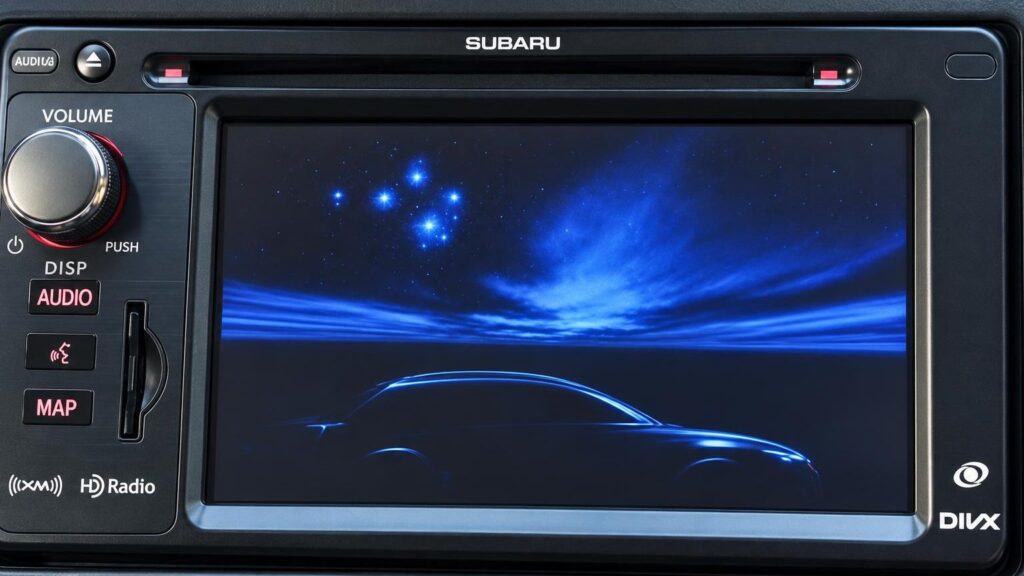
The system can be identified by its appearance, so sometimes a photo or a visit to a branch is enough. Below is which cars belong to which system:
- su1 – C2 (Denso) with DVD: Forester, Legacy and Outback from 2007, Impreza from 2008.
- su2 – C1 with DVD: Forester and Impreza 2003–2007, Legacy 2004–2007, Outback 2006–2010, Tribeca from 2007.
- su3 – systems from the USA with DVD: Forester, Impreza, Legacy, Outback, Tribeca, as well as Isuzu.
- su4 – iGo Harman Kardon with SD card: only Subaru from the USA: Impreza and Impreza WRX from mid-2012, BRZ and XV Crosstrek from mid-2013, Forester from mid-2012, Legacy and Outback from mid-2013.
If you are unsure about the system type, take a photo of the navigation screen and the center console and show it to a technician at a branch.
Which maps are installed when updating Subaru navigation?
A set of three discs is intended for DVD systems (su1, su2, su3). The first disc covers Western and Northern Europe: Germany, France, Italy, Spain, the Scandinavian countries, Belgium, the Netherlands, Switzerland, Austria, the United Kingdom and others. The second covers France, Spain, Portugal, Ireland, the United Kingdom, Andorra and Monaco.
The third disc covers Central, Eastern and Southeastern Europe: Lithuania (detailed maps), Latvia, Estonia, Poland, the Czech Republic, Slovakia, Hungary, the Balkan countries, Turkey, Ukraine and others.
For SD systems (su4), your original working card is updated – the latest maps of all of Europe and Russia are installed. Therefore, the card must be in good condition and recognized by the system.
Is it possible to update the navigation yourself or for free?
Many people ask how to update navigation themselves and whether there is a free navigation update. For older systems, manufacturers’ map updates are often no longer available, and downloading unofficial files online is risky: a poor-quality copy may damage the system data or the card.
To update it yourself, you would need to know the system type, have a suitable disc or card, and know how the system recognizes them. That is why many people choose to have the update done by a technician. For the price, contact a branch or call the car navigation phone number.
Portable navigation devices are updated in a similar way – read about it on the page TomTom, Garmin, iGo update.
Do not use copies of unknown origin – they may damage the original card, which you will need in the future.
When a map update alone is not enough
Sometimes the problem is not the maps. If the navigation “searches for satellites” for a long time, shows an incorrect position or does not read the disc, the cause may be the GPS receiver, the antenna, the DVD reader or the screen. In that case a new disc will not help, so it is worth finding out the fault first.
We wrote in more detail about how the satellite positioning system works in the article How a GPS navigation system works. And if the system “freezes” or shows errors, the article about car computer systems will also come in handy.
Our branches are open Monday–Friday 9:00–18:00; we are closed on weekends. For car navigation inquiries, there is a separate phone number – you will find it on the page.
How the navigation update works
- Come to a branch. Visit our Vilnius, Kaunas, Klaipėda or Šiauliai branch on weekdays 9:00–18:00. Bring your car details, and for the su4 system, the original SD card.
- We identify the system. The technician determines which system your Subaru has: su1, su2, su3 or su4.
- We discuss the price. We tell you the price and exactly what we will do before starting work.
- We update the maps. We install the latest Lithuanian and European maps onto the disc or card.
- We check and hand it over. We check that the navigation works and explain how to use it.
Frequently asked questions about navigation updates
How much does a navigation update for a Subaru cost?
The price depends on the system type (su1–su4) and the scope of work, so we do not state it on this page. Contact a branch or call the car navigation phone number to get an answer for your car.
Is the navigation update free of charge?
We do not offer a free update on this page. For older Subaru systems, manufacturer updates are often no longer available, and the price should be discussed with a branch.
How do I update my car’s navigation?
First, the system (su1–su4) must be identified, and then the disc or card intended for it should be used. The simplest way is to come to a branch – the technician will identify the system and explain what to do.
Will you update navigation in Alytus, Panevėžys or Marijampolė?
We have branches in Vilnius, Kaunas, Klaipėda and Šiauliai, and we do not have any in other cities. Choose the branch that is most convenient for you to reach.
Is my old SD card suitable?
For su4 systems, the original working card is updated. If it is faulty or the system does not read it, the cause must be determined first.
Which countries are included in the maps?
The DVD set includes Western, Southern, Northern, Central, Eastern and Southeastern Europe, with Lithuania in detail. The SD cards contain all of Europe and Russia.
Will you update navigation systems of other brands?
You can find information about navigation systems of other brands on the navigation map update page. For a specific system, please contact a branch.