
Bring it to the nearest branch or call
- Vilnius Kareivių g. 11A +370 655 77057
- Kaunas Savanorių pr. 155 +370 639 69600
- Klaipėda Sausio 15-osios g. 13 +370 647 07741
- Šiauliai Gegužių g. 30 +370 682 29052
All branches are open Mon–Fri 9:00–18:00
Looking for how to carry out a Toyota navigation update because your maps no longer show new bypasses, roundabouts or all streets? This page will help you understand which navigation system is installed in your car and which disc, card or HDD update you need to choose.
Below you will find tips for identifying systems, the disc start-up procedure that must not be skipped, the most common problems and answers to drivers’ questions. If your car’s system is not mentioned here, it is best to call first rather than buy a random disc. For more general information about systems of all brands, see the page navigation map update.
Most common Toyota navigation problems
Drivers’ questions most often relate to one of the situations described below.
Toyota navigation shows old maps
The maps on the disc, card or HDD have not been updated for several years, so new roads, bypasses and roundabouts are missing. In this case the navigation may be working properly, the data is simply outdated.
What you can check yourself: Check which storage medium is used: disc, SD card or HDD, and take a photo of the start-up screen.
We update maps according to the system type: DVD, SD card or HDD.
The new navigation disc is stuck or does not load
Most often the disc was inserted without performing the required start-up procedure, so the disc gets stuck in the system or the maps work incorrectly.
What you can check yourself: Do not force the disc. Check whether the system really uses a DVD (without an SD slot and HDD). The procedure involves the battery, so if you are not confident, contact a technician.
We check whether the disc is suitable for the system and help you start it correctly. We will tell you the price when you call.
Chinese characters appear on the screen
According to our DVD system procedure, after disconnecting the battery, Chinese characters should be visible on the screen and nothing should load – this is part of the procedure, after which the new disc is inserted.
What you can check yourself: If there are no characters, the procedure requires disconnecting the battery terminal again for 10 minutes. If you do not feel confident, contact a technician.
If nothing loads after the procedure, call us and describe what the screen shows – we will find out what is wrong.
Toyota navigation does not detect the SD card
The card may be damaged, its content may be incompatible with the system, or the card may be from a different system generation.
What you can check yourself: Remove the card and check whether the contacts are damaged. We advise against trying to format it on a computer, as the system may no longer recognise it.
For TNS510 systems we update your old working card, while for TNS350 we sell a new card with maps.
I can’t find my Toyota model in the navigation description (RAV4, Auris, Verso, Avensis)
The same brand used different systems in different years, so the model name alone is not enough. Avensis, Avensis Verso, Yaris, RAV4 or Land Cruiser may have units of different generations.
What you can check yourself: Write down the year of manufacture, the system label on the screen bezel (B9xxxx, TNS) and check whether there is an SD slot.
Based on this information, we select the suitable option (t1–t13).
Maps in newer Toyotas (C-HR, Corolla Cross) are outdated
The systems in newer models differ from the older DVD, SD or HDD units. They are not covered in our descriptions.
What you can check yourself: Write down the system name and the car’s year of manufacture.
Call the car navigation line, tell us the model and year – we will confirm whether we can help.
An American Toyota needs Lithuanian maps
American Gen2–Gen5 systems have separate variants that differ from those of European Toyotas. A European disc will not work in them.
What you can check yourself: Check whether the start-up screen is in English and has an „I agree” button, and write down the make and year of manufacture.
We select the appropriate US system variant with a detailed map of Lithuania (codes t9–t13).
Toyota HDD navigation does not show the map or works unreliably
The cause may be an outdated map version or a fault in the system itself. This can only be determined by examining the specific system.
For HDD systems (t3, t4) we offer a map update service. For other faults, please call and describe the situation.
The navigation does not show your location accurately
Most often the cause is an outdated map version that lacks new roads. In rarer cases, there may be a fault in the GPS antenna or connectors.
What you can check yourself: Check whether the problem persists in an open area, away from buildings.
If the maps are outdated, we update them. If a hardware fault is suspected, call us and we will discuss the next steps.
Which Toyota navigation system is installed in your car?
Over several decades Toyota has used different systems, and maps for one are not compatible with another. Therefore, before updating, the most important thing is to determine the exact type. In our descriptions the systems are marked with codes t1–t13, and each has its own map variant.
Most often the system can be identified by its start-up screen, the model marking and the type of storage medium used: a disc, an SD card or an internal hard drive.
- DVD systems with a touch screen (B9000–B9030, Gen03, Gen05, Gen08, TNS600, TNS700): cars manufactured in 2004–2012. They have no SD card slot and no internal HDD; the model code B9xxxx is usually printed on the bottom right of the screen bezel.
- HDD systems (for example, B9012): the 2009–2013 versions of the Avensis, Prius and Land Cruiser are mentioned.
- SD systems (TNS510, TNS350): they have an SD card slot, and the maps are stored on the card.
- TNS410 TomTom: an integrated TomTom device that can be removed.
- First-generation Denso / Aisin systems (TNS300, TNS310, Gen01): installed, for example, in the Avensis, Yaris, RAV4 and Land Cruiser 120 models.
Take a photo of the start-up screen and the screen bezel with the model marking – it is much easier to identify the system from photos.
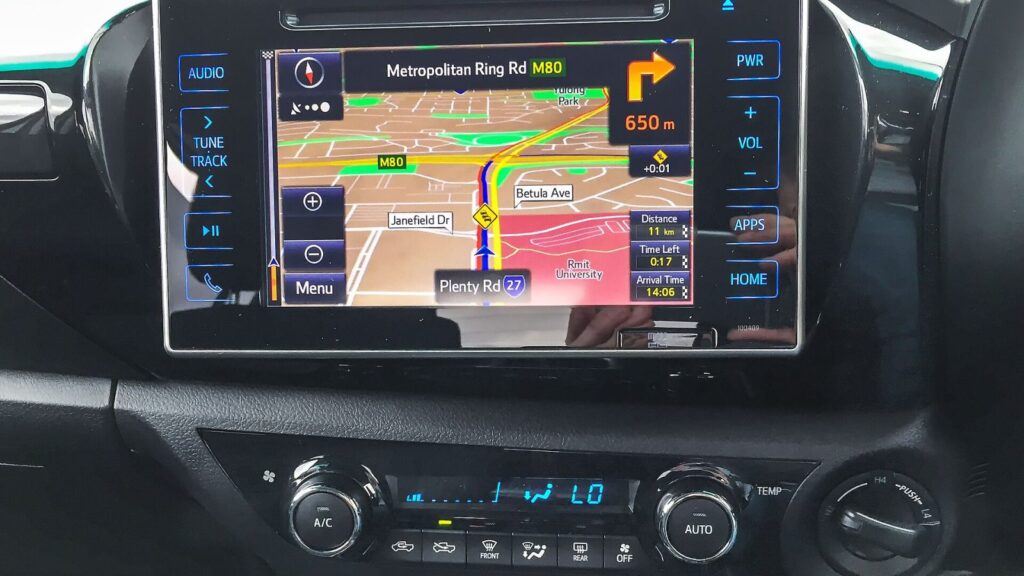
European or American Toyota: why it matters
Some systems are intended only for European (EU) Toyotas, and some only for American (US) ones. American Gen4 and Gen5 systems were installed in the Camry, Highlander, Sienna, Tundra, 4Runner, Prius and other models, while Gen2 and Gen3 were installed in older Camry, Avalon, Land Cruiser or Prius models. Variants with a detailed map of Lithuania are also available for them, but European and American systems are not interchangeable.
American systems can be recognised by the make, year of manufacture and appearance. The start-up screen often shows an English-language consent button „I agree” – this is a good indication that you have an American version. If in doubt, it is better to ask before buying.
Disc start-up procedure: why it must not be skipped
For older DVD systems, simply inserting a new disc is not enough. If you do not follow the procedure, the disc may get stuck and the maps may not work correctly.
The procedure we specify for DVD systems is as follows: the old disc is removed, one battery terminal is disconnected and you wait 5 minutes. Then the ignition is switched on, and according to the procedure, Chinese characters should appear on the navigation screen and nothing should load. If there are no such characters, the terminal is disconnected again for 10 minutes. Only after you see the Chinese characters do you insert the new disc.
When working with the battery, follow the car manufacturer’s instructions, switch off the ignition beforehand, and note that after disconnecting it you may need to reset the clock or radio settings. If you do not feel confident working under the bonnet, contact a mechanic.
Is it worth updating Toyota navigation, or should you choose a phone?
If the factory system works, updating the maps lets you keep using the car’s screen and sound system, and there is no need to mount a phone on the windscreen. Phone apps usually require an internet connection, while the factory system stores the maps on a disc, card or HDD.
The situation is different when the screen no longer responds to touch or the unit itself is faulty – then the solution depends on the fault. We describe updating standalone devices (TomTom, Garmin) on the page TomTom, Garmin, iGo update.
If you want to understand how satellite navigation determines location and why maps become outdated, read the article How a GPS navigation system works.
Navigation for the RAV4, Auris, Avensis, C-HR or Corolla Cross: what to know
People often search by model, but the same Toyota had different systems in different years. For example, the first-generation Denso systems in the Avensis and Yaris work with DVD, while the 2009–2013 Avensis may have an HDD. The RAV4 in older versions is also mentioned as one of the suitable first-generation systems.
Newer models, such as the C-HR or Corolla Cross, usually have newer-generation multimedia systems. They are not included in our descriptions, so please call us to check. We describe the systems of the premium brand Lexus separately: Lexus navigation update.
How a Toyota navigation update works
- We determine the system type. You tell us the car model and year, and from photos or the model code we determine whether it is a DVD, SD, HDD or TomTom system, European or American.
- We select the variant. Based on the code (t1–t13), we select the suitable update: Baltic or full Europe maps, if such variants are available for your system.
- We discuss the price. We give the price over the phone, once it is clear which system is installed in your car.
- We update maps. We prepare a disc, card or HDD update to match your system. For DVD systems, it is important to carry out the described disc start-up procedure.
Frequently asked questions about Toyota navigation updates
How much does a Toyota navigation update cost?
The price depends on the system type: DVD, SD card, HDD or TomTom, as well as on whether the system is European or American. We will confirm the exact amount over the phone, once it is clear which system is installed in your car.
How do I know which Toyota navigation disc is right for me?
We look at the car’s year of manufacture, the system model code (B9xxxx on the screen bezel), the start-up screen, and whether there is an SD card slot or an HDD. If you are not sure, have this information and photos ready and give us a call.
Will a new disc fit any Toyota?
No. Systems differ by generation and region: there are separate versions for European and American Toyotas. An incorrect disc will not work, or the maps will be displayed incorrectly.
Do I need to disconnect the battery when inserting a new disc?
For DVD systems, following the procedure we have described, yes: one battery terminal is disconnected, you wait 5 minutes, and then check whether Chinese characters appear on the screen. If you do not feel confident, please contact a technician.
Can you update an SD card if the old card has been lost?
According to our description, for the TNS510 we update the old working card – we cannot produce a new card. For the TNS350 system, a new card is sold, so the old one is not needed.
Are there Lithuanian maps for American Toyotas?
Yes, for American Gen2–Gen5 systems there are versions with a detailed map of Lithuania. Before ordering, have the make, model and year of manufacture ready.
Will you update the navigation of a newer model, such as the C-HR or Corolla Cross?
We do not have descriptions for these models, so please call the car navigation phone line to check regarding them.
When can I come to a branch?
Our branches in Vilnius, Kaunas, Klaipėda and Šiauliai are open Monday to Friday, 9:00–18:00, and closed on weekends. There is no need to register or call in advance – just come during opening hours. Details of all branches are on the contacts page.