Bring it to the nearest branch or call
- Vilnius Kareivių g. 11A +370 655 77057
- Kaunas Savanorių pr. 155 +370 639 69600
- Klaipėda Sausio 15-osios g. 13 +370 647 07741
- Šiauliai Gegužių g. 30 +370 682 29052
All branches are open Mon–Fri 9:00–18:00
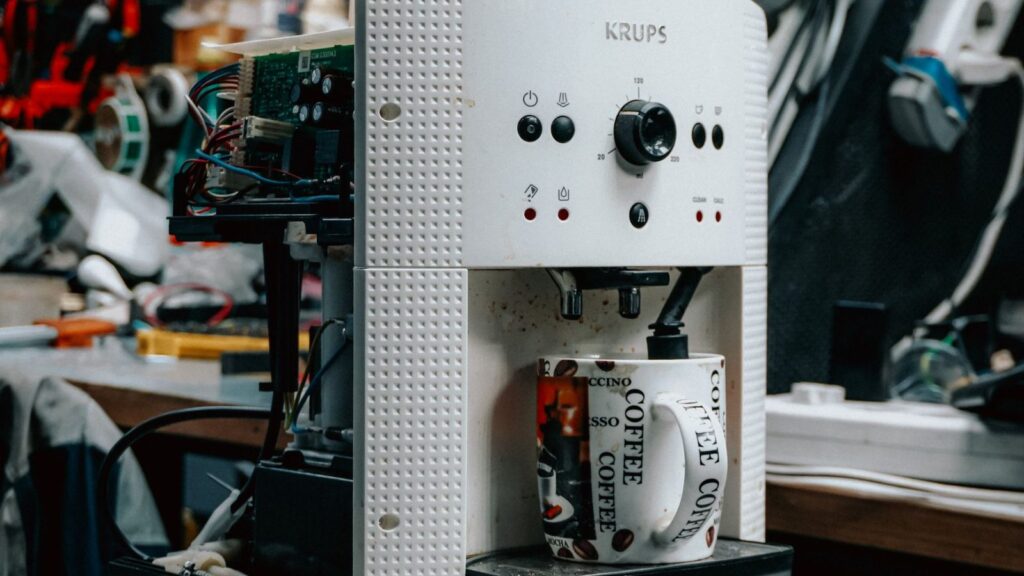
Other electronics repair covers everything that doesn’t fall into the phone, computer or TV category: coffee machines, robot vacuum cleaners, game consoles and other electronic devices. If your coffee machine no longer pours coffee, your robot is standing in the middle of the room, or your console won’t turn on, this page will help you understand what may have happened.
Below you will find information on what determines the repair price, the most common faults described with the symptoms customers usually report, tips on when a repair pays off and when it is better to choose a new device, and an explanation of how repairs are carried out at our branches.
Most common faults: coffee machine, robot and console
Below are the faults people ask about most often. Before bringing in your device, try the simple checks, but never open the casing of a device that is connected to the mains.
Coffee machine does not dispense water or coffee
Most often the cause is limescale-clogged tubes or valves, a blocked outlet channel, or a worn water pump. Sometimes the culprit is a coffee grounds container or water tank that is not fully inserted.
What you can check yourself: Check that there is water in the tank and that it is fully inserted, and that the grounds container is placed correctly. Rinse the tank and clean the dispensing spout.
We diagnose the flow path, clean or replace the clogged parts and, if necessary, the water pump as well. The price depends on the fault.
Coffee machine leaks from the bottom
Most often the cause is worn seals, a cracked tube, or an overfull drip tray and grounds container. Sometimes water seeps through a cracked boiler connection.
What you can check yourself: Empty the drip tray and the grounds container, and check that there is not just condensation under the machine. If there is a lot of water and it keeps happening, do not use the machine.
We find the leak and replace the seals or tubes. If the boiler is damaged, the scope of work is larger – we give the price after diagnostics.
Coffee machine does not heat the water, coffee is barely warm
Often the cause is limescale deposits on the heating element, a burnt-out heater, or a faulty temperature sensor.
What you can check yourself: Run the descaling program with the product recommended by the manufacturer if you haven’t done so for a long time. Do not use extremely hot water or unsuitable products.
We determine whether the problem is limescale or the electrical part, and accordingly descale the machine or replace the heating element or boiler.
Coffee machine grinder howls, rattles or does not grind beans
A small stone or foreign object may have got into the grinder, the burr discs may be worn, or the gear may be worn out. Too much oily coffee can also clog the grinder.
What you can check yourself: Check that there are no foreign objects in the bean hopper, and use only beans without additives or flavored oils.
We disassemble the grinder, clean it, and replace the burrs or the gear.
Coffee machine shows a descaling error and won’t clear it
After descaling, an unfinished cycle may remain, the flow sensor may be clogged, or the settings may not have reset. A common cause is an interrupted descaling because the machine was switched off too early.
What you can check yourself: Complete the descaling program to the end following the instructions, using a suitable product and a sufficient amount of water.
We perform a full descaling and check the sensors and tubes. If parts need replacing, the price is higher – we give it after diagnostics.
Robot vacuum cleaner does not charge or drains quickly
Most often the cause is a worn battery, dirty charging contacts, or a faulty base station. After 2–4 years, the battery capacity drops noticeably.
What you can check yourself: Wipe the charging contacts with a dry cloth and try a different socket. Check that the station has not been pushed away from the wall.
We test the battery and the charging circuit and, if necessary, replace the battery. You can find more about this type of device on the robot vacuum cleaner repair page.
Robot vacuum spins in circles, fails to clear its path, or its brush does not rotate
The most common causes are dirty cliff sensors, hair stuck in the motor shaft, or worn wheels. A dirty laser sensor can also cause navigation errors.
What you can check yourself: Clean the brush, wheels and sensors of hair and dust. Check that nothing is obstructing the wheels.
We clean and replace brushes, wheels, sensors and motors.
Console does not turn on or shows no picture
The most common causes are a damaged HDMI port, a faulty power supply unit, or a malfunctioning power controller. The port often fails because the cable is plugged in and unplugged frequently.
What you can check yourself: Try a different HDMI cable, a different TV input and a different power outlet. If the console does not turn on, check the power cable.
We diagnose and, if necessary, replace the HDMI port. You can find more on the console repair page.
Console overheats, is noisy and shuts down
The most common causes are a clogged cooling system, dried-out thermal paste, or a worn-out fan. This is typical after 2–3 years of intensive use.
What you can check yourself: Check that the console is placed in an open area and that the ventilation openings are not covered. Do not blow air inside and do not open the casing.
We clean the cooling system and replace the thermal paste.
Electronic device does not turn on after being dropped or exposed to moisture
An impact can loosen connectors or crack the board, and moisture causes corrosion. The longer the device stays damp, the greater the damage.
What you can check yourself: Disconnect the device from the mains and do not try to turn it on. Let it dry naturally; do not use a hair dryer.
We carry out diagnostics, clean off corrosion and replace damaged parts. The price depends on the device and the extent of the damage.
Is it worth repairing, or should you buy a new device?
A simple rule: if the repair costs less than half the price of a similar new device, repairing is usually worthwhile. Descaling a coffee machine, replacing a robot vacuum brush or cleaning a console’s cooling system costs several times less than new equipment.
In more complex cases, for example when a coffee machine’s main board or entire heating system fails, the price difference is smaller. In that case, after diagnostics, we tell you how things really stand, and we often advise against repairing if the solution would not pay off.
It is also worth considering the age and price of the device. A five-year-old coffee machine that cost €700 is almost always worth repairing, while a simple device that cost €80 is not always. Read more about this in the article when it is worth repairing a coffee machine.
- The repair costs up to half the price of a new device – it is usually worth repairing.
- The device is expensive but has been used and maintained for a long time – it is worth repairing even a costlier fault.
- A cheap device with a damaged board – it is often cheaper to buy a new one.
Before throwing a device away, bring it in for an assessment. If the repair will not be cost-effective, we will tell you right after diagnostics.

What electronics we repair and which manufacturers
Coffee machines are what we receive most often: DeLonghi, Jura, Philips, Saeco, Krups, Siemens and other manufacturers, whether automatic, capsule or espresso. Coffee machine repair in Vilnius, Kaunas, Klaipėda and Šiauliai is carried out at our branches, and you can find more about descaling and typical faults on the page coffee machine repair and descaling.
The second large group is robot vacuum cleaners, such as iRobot, Roborock or Xiaomi. You can find information about them on the page robot vacuum repair. The third group is game consoles: PlayStation, Xbox and Nintendo; their repair is described on the console repair page.
If your device is not on the list, please contact us anyway. We assess other electronic devices individually, and for larger household appliances, see the household appliance repair section.
How to extend the lifespan of electronics
Most faults do not appear suddenly but result from gradually accumulating causes: limescale, dust, overheating, moisture or voltage surges. A little daily care often postpones repairs for several years.
A coffee machine should be descaled according to water hardness, not only when the warning light comes on. A robot vacuum needs its brush, wheels and sensors cleaned regularly. For a console, it is important to have free space around it and not to keep it in a closed cabinet without air circulation.
- For your coffee machine, use filtered water and regularly wash the coffee grounds container and drip tray.
- Clean hair off your robot vacuum’s brush and side brushes every week.
- Blow dust off your console’s ventilation openings from the outside a few times a year.
- Connect expensive electronics through a surge protector.
You can find out more about why devices fail and how their lifespan depends on usage habits in the articles why home electronics fail and what determines the lifespan of devices.
What to bring to the branch
The device itself is enough. If the fault appears only under certain conditions, for example, the coffee machine leaks only after the cycle ends, tell the technician about it; this shortens diagnostics.
With a coffee machine, it is worth including the water tank and the coffee grounds container; with a robot, the base station and charger; with a console, the power cable and controller if the problem is related to it. If the device displays an error, take a photo of it before bringing it in.
Our branches are open Monday to Friday, 9:00–18:00, and closed at weekends.
How other electronics repair works
- Bring the device to a branch. Visit our Vilnius, Kaunas, Klaipėda or Šiauliai branch on a weekday between 9:00 and 18:00 and briefly tell us what happened.
- Diagnostics. The technician inspects the device, determines the cause of the fault and tells you whether the repair is worthwhile.
- Agreed price. We tell you the price before starting any work. We begin the repair only with your consent.
- Repair. We replace or repair the faulty parts, then clean and test the device.
- Warranty and collection. We provide a warranty for the work carried out. You collect the repaired device at the branch.
Frequently asked questions about other electronics repair
How much does coffee machine repair cost?
The price depends on the fault: descaling usually costs less than replacing a water pump, grinder or heating element. We will tell you the exact price after diagnostics, before we start the repair.
Do you repair DeLonghi and Jura coffee machines?
Yes, we repair coffee machines from various manufacturers, including DeLonghi and Jura. We assess the fault of a specific model once you bring the device to a branch.
How much does it cost to repair an electronic device?
The price depends on the device, the fault and whether parts need to be replaced. We agree on the exact amount after diagnostics.
Is a warranty provided for repairs?
Yes, we provide a warranty for the work carried out. Please ask at a branch for the specific terms.
Do you do renovation work in apartments, bathrooms or kitchens?
No, we repair devices: coffee machines, robot vacuum cleaners, consoles and other electronics. We do not carry out construction or finishing work.
In which cities can I bring a device?
Our branches operate in Vilnius, Kaunas, Klaipėda and Šiauliai. All are open Mon–Fri 9:00–18:00, and you can find the exact addresses on the contacts page.
How can I find out whether the repair is worthwhile?
After diagnostics, we tell you the cause of the fault and the repair price. If it is worth keeping the device in service, we recommend repairing it; if not, we tell you so honestly.